Docs
Autonomous mode
In autonomous mode, an issue moves through Last Light on its own. Once triage
marks it ready, the harness picks it up, builds it, and parks the pull request
where a human will see it. Nobody has to type @last-light build.
Labels on the issue record how far it has got. The dashboard's
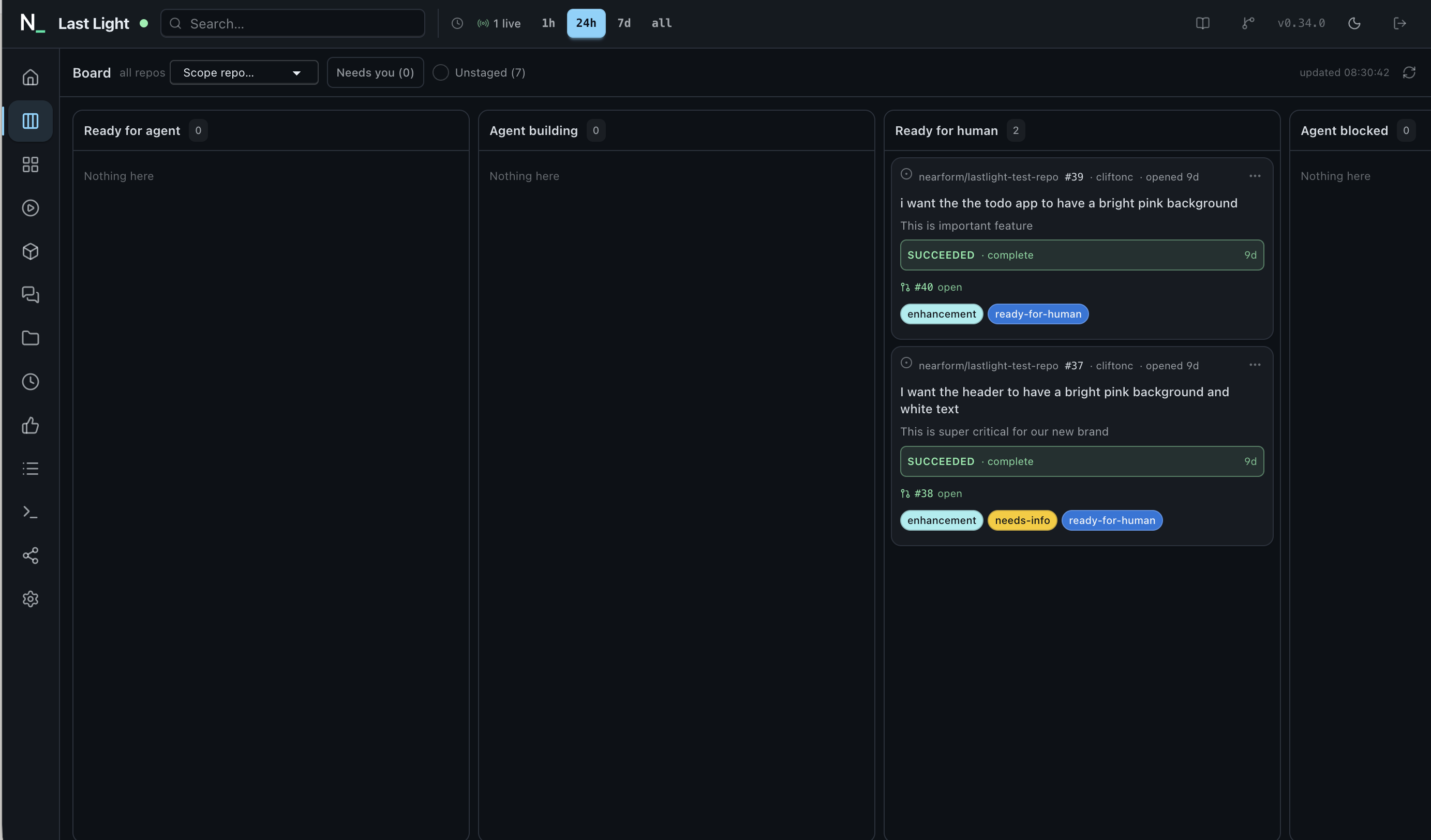
Board shows every issue in the pipeline as a card that you
can drag, retry, or approve.
The pipeline ships switched off, and it starts cautious even once you switch it on. Two approval gates are on by default, and a human merges every pull request. You loosen those settings yourself, one at a time, until the pipeline runs as hands-off as you want.
How an issue moves through it
The pipeline has one stage, build, and four labels. Each label
becomes a column on the Board:
ready-for-agent ──▶ agent-building ──▶ ready-for-human   (succeeded)
└─▶ agent-blocked (failed, cancelled, out of budget)- Triage marks it ready. The
issue-triage workflow adds
ready-for-agentto issues that are fully specified. A maintainer can also add the label by hand. - The label starts a build. The
issues.labeledwebhook dispatches a build run. A backstop cron (pick-up-ready-issues, every 20 minutes) catches any issue whose label event was never delivered. - The label moves at dispatch, before the run starts. The
harness swaps
ready-for-agentforagent-buildingfirst. The issue then acts as its own lock: a redelivered webhook or the next sweep tick no longer sees an entry to pick up. - The run ends on a terminal label. A success moves the
issue to
ready-for-human, and the pull request that closes it appears as a link on the card. A failure or a cancel moves it toagent-blocked, with the reason shown on the card.
Turning it on
Autonomy is configured by the operator in the overlay's
config.yaml. The whole pipeline is already in the shipped
defaults, so opting a repository in takes one line:
# instance/config.yaml
autonomy:
  repos:
    - acme/web
    - acme/api
Names must match exactly, with no globs. Matching is plain string equality,
so acme/* is a repo name that will never exist. The restriction
is deliberate: if a pattern could enable a whole org, any new repo would get
an agent and a budget the moment somebody created it, before anyone had
reviewed it.
autonomy key in
per-repo config. If a repo could list
itself, anyone who could commit a file could spend the operator's money. A
repo can opt out: disabled.workflows: [build] in its
.lastlight/lastlight.yml turns the pipeline off for the whole
repo. The hold label (lastlight-ignore) turns it off for a
single issue.
These are the full defaults you are layering over:
autonomy:
  repos: []                      # ships inert: no repo, no pipeline
  stages:
    build:
      enter: ready-for-agent       # the label that starts the stage
      running: agent-building      # applied at dispatch
      on_success: ready-for-human  # a human reviews, and merges, the PR
      on_failure: agent-blocked    # the run stopped; a human reads why
      workflow: build
      gates:
        post_architect: true       # pause after the plan
        post_reviewer: true        # pause after the independent review
      on_merge: none               # none | auto | auto-low-impact
  budget:
    maxConcurrentBuilds: 2         # across every repo, at any instant
    maxBuildsPerRepoPerDay: 3      # per repo, per UTC day
    dailyUsd: 25                   # deployment-wide model spend per day
    repoDailyUsd: 10               # one repo's share of it
Overlay config merges into these defaults key by key. You only set the keys you want to change. Labels are renamed in the same way; the Board takes its column titles from whatever labels you configure.
Gates and merging: from supervised to hands-off
By default an autonomous build stops twice for a human, then stops a third time at the merge button.
-
post_architectpauses once the architect has written its plan, before any code is written. -
post_reviewerpauses once the independent reviewer has finished, before the pull request is finalised. -
on_merge: noneleaves the pull request onready-for-humanfor a human to merge.
You can resolve a gate from the card on the Board, from the dashboard's run
view, by commenting @last-light approve on the issue, or from
Slack. The run then resumes exactly where it paused.
Stage gates can only add gates. Only true values take
effect, so a stage can switch on a gate the workflow left off, but it can
never switch off one that your APPROVAL_GATES setting enabled.
The result is that an autonomous build pauses at post_architect,
while an @last-light build on the same repo does not, unless your
environment enables that gate for every build.
on_merge decides what happens to the pull request:
| Value | Behaviour |
|---|---|
none | The default. The pull request waits on ready-for-human and a human merges it. |
auto | The build agent turns on GitHub auto-merge for the pull request it opened. CI and your branch protection still decide whether and when it lands. The agent never merges the pull request itself. |
auto-low-impact | Not implemented yet. There is no impact signal for a feature pull request today. The value is accepted and recorded, and it behaves like none. |
For a fully hands-off pipeline, from triage label to merged pull request:
# instance/config.yaml
autonomy:
  repos:
    - acme/web
  stages:
    build:
      gates:
        post_architect: false
        post_reviewer: false
      on_merge: auto
Setting a gate to false only removes the stage's own gate. If
APPROVAL_GATES in your environment names post_architect
or post_reviewer, those gates still pause every build, autonomous
or not.
on_merge: auto, nothing stops for a person.
Once a pull request passes the checks you require, it merges. Only do this
on a repo where required status checks, and ideally a required review,
would stop a change you don't want. Start with one repo and a low
budget.
Safety limits
Every autonomous dispatch passes through one build dispatch gate, whichever way it arrived: the label webhook, the backstop sweep, the Board, or the API. The gate checks, in this order:
- The hold label. An issue carrying
lastlight-ignoreis skipped. - The allow-list. A repo not on
autonomy.reposis skipped. - Already built. If the bot re-applied the entry label to an issue it has already built, the gate skips it. This is what stops a label loop. If a human re-applied the label, it counts as an explicit retry and the build runs again.
- Already running. An issue with a build queued, running or paused is skipped. Two agents can't share one build workspace.
- The budget, in this order:
maxConcurrentBuilds: autonomous builds in flight across the deployment. A build paused at a gate doesn't count.maxBuildsPerRepoPerDay: builds started today, whatever their outcome. A failed build still cost money.dailyUsdandrepoDailyUsd: model spend today, for the deployment and for the repo.
Every comparison is >=, so a configured 0 refuses
everything. That is how you stop the pipeline without un-configuring it. The
day-based limits reset at midnight UTC, the same day boundary the dashboard's
stats use.
How loudly a refusal is reported depends on how long it will last. A
concurrency skip clears within minutes, so it only writes a log line. A
repo's daily quota writes an autonomy.skip row in the activity
log. An exhausted spend budget also moves the issue to
agent-blocked and posts one comment on the issue. The
comment names the limit, when it resets, and how to re-arm. No limit is
enforced mid-run: all checks happen before a build starts.
The Board
The dashboard's Board tab is the pipeline's control
surface. It has four columns per stage, one for each label, in pipeline
order. Its universe is the autonomy allow-list, so a deployment with
autonomy.repos: [] shows an empty board and makes no GitHub
reads at all.
- Cards are issues. Each card shows the issue's latest run, the phase that run is actually in, any pending approval, the failure reason if it failed, a short excerpt of the issue, and the pull requests that close it.
- Dragging a card moves work. Dropping a card on a stage's entry or running column starts a build through the same dispatch gate, as you, the logged-in human. Dropping it on a terminal column only moves the label. If the gate refuses, for example because the budget is spent or a build is already running, the card shows the reason.
- The card menu lists what's possible right now. Actions include approve or reject a pending gate, cancel a run, retry (resume the failed run from the phase that failed), Rebuild, and Unblock & rebuild (start again from the entry column). The server works out which actions are enabled and why, so the Board never offers anything the gate would refuse.
- Filters. Needs you narrows the cards to the ones paused at an approval gate. Unstaged opens a drawer of open issues that carry no stage label yet, so you can drag them in.
- It updates live. A server-sent change signal refetches the board whenever a label moves or a run changes phase. GitHub reads are batched and cached, so an open Board costs about sixty GitHub requests an hour for twenty repos, however many people are watching.
Further reading
- The build workflow: the architect, executor and reviewer cycle each autonomous dispatch runs.
- Issue triage: where
ready-for-agentusually comes from. - Configuration: the overlay,
APPROVAL_GATES, and the rest of the config tree. - Per-repo config: how a repo opts out with
disabled.workflows. - Spec: the build dispatch gate and the pipeline board, the full design with every branch explained.